 d079947bdf
issue: #43427
Upload research reports on geographic information systems.

Signed-off-by: Yinwei Li <yinwei.li@zilliz.com>
31 KiB
Background
Milvus is a high-performance vector database widely used in fields such as image retrieval, recommender systems, and semantic search. With the increasing integration of scenarios such as LBS (location-based service), MultiModal Machine Learning retrieval, and driverless technology spatial awareness and semantic retrieval requirements, users increasingly need to be able to perform vector searches in "geographical context".
Currently, Milvus only supports numerical, string, and vector type fields, lacking native understanding and index support for geographical information. This limits its capabilities in emerging spatial computing applications.
Requirement
The following is a typical use case that combines geographic information with vector retrieval:
Perform vector search under spatial constraints
I would like to search for products, stores, and images that are within 1 kilometer of me and semantically most similar.
Example Industries:
-
Local services (such as Ele.me, Uber)
-
Map content recommendation (e.g., AutoNavi Maps recommendation)
-
E-commerce scenarios (LBS advertising, nearby same-item retrieval)
-
Security surveillance (tracking similar faces near a given location)
In addition to being combined with vector retrieval, supporting Geographic Information System (GIS) can also meet many common requirements for geographic information-based analysis. For example, heat map analysis, planning transportation routes, and planning market locations through statistical analysis, etc.
Sometimes, users may also choose different coordinate systems to analyze geographic data from different perspectives based on different usage scenarios. And since geographic data usually comes from third-party platforms (maps, remote sensing, testing, etc.), with diverse data formats, it is necessary to support at least WKT and WKB, and GeoJson, GeoHash and other data formats can be added as needed later.
Based on the above requirements, it is necessary to provide support for the geospatial data structure in Milvus, including the definition of its core data types, various query operators, index optimization, etc. The following details the feasible implementation plan from several aspects.
Implementation Plan
Data Type
Geo Spatial DataType is a data structure used to describe geospatial information. In the SFA (Simple Feature Access) standard developed by the OGC, the following common geometric types are defined:
-
Point: Represents a two-dimensional coordinate, usually representing different objects depending on the scale
-
LineString: An ordered collection composed of two or more points, often used to represent rivers, roads, etc.
-
Polygon: Represents a planar region that can have "holes".
-
MultiPoint: A collection of multiple points
-
MultiLineString: A collection of multiple line strings
-
MultiPolygon: A collection of multiple polygons
-
GeometryCollection: A collection composed of all the above geometries
The input and output of these data types have two representation methods in the SFA standard: WKT (Well Known Text) and WKB (Well Known Binary). The former is a human-readable format, such as: POINT (0 0) , MULTILINESTRING ((0 0, 1 1), (2 2, 3 3)) , etc., while the latter is a binary format for efficient storage.
In Milvus, we do not need to manually define the above data types. Instead, we can introduce third-party libraries, wrap the geometric classes provided by third-party libraries in Milvus, and then perform unified processing on geometric data and provide a unified processing interface externally.
Common third-party libraries include GEOS, GDAL, etc. Among them, GEOS (Geometry Engine - Open Source) is an open-source geometric computation library that adheres to the OGC SFA standard. OGR, on the other hand, is a wrapper library for the geos library and some functions such as coordinate transformation and other geographic coordinate types. It has now been integrated into GDAL, which contains many contents unrelated to geographic information, such as grating processing. For the scalability of the geographic information system, we choose to use the OGR library encapsulated by GDAL. Meanwhile, for the sake of simplicity, we need to remove the extra parts we don't need (such as grating processing) during compilation.
Coordinate System
Commonly used coordinate systems include WGS 84, the international standard for latitude and longitude; Web Mercator, the standard for web maps; etc.
The underlying layer of GEOS has no coordinate system and only performs operations on geometric shapes in the Cartesian set (plane coordinate system). However, the WKT information input by the user may be based on latitude and longitude information, and when the scale is large enough, there will be a problem of excessive error caused by direct conversion between spherical coordinates and plane coordinates.
Therefore, when high-precision calculations are required, it is necessary to first use the coordinate transformation function provided by GDAL for conversion before performing the calculations.
Query Operator
Common query operators include:
1. Topological Relationships
These functions are used to determine whether there is a certain topological relationship (such as intersection, inclusion, coverage, etc.) between two geometric objects, based on the logical relationship between the shape and position of spatial objects.
| Function Name | Description |
|---|---|
ST_Contains(A, B) |
Determine whether A completely contains B (excluding the boundary) , and there is at least one common point in the interiors of A and B. For example: whether a city contains a park. |
ST_Covers(A, B) |
Determine whether A covers B, i.e., all points of B are inside or on the boundary of A. |
ST_Equals(A, B) |
Determine whether A and B represent the same geometric object , i.e., have the same coordinate sequence and type. |
ST_Intersects(A, B) |
Determine whether A and B have at least one common point , which is the most commonly used spatial relationship judgment function. |
ST_Overlaps(A, B) |
Determine whether A and B overlap, i.e., they have the same dimension (e.g., both are faces or both are lines), and their regions partially coincide, but neither completely contains the other. |
ST_Touches(A, B) |
Determine whether A and B only touch at the boundary, but do not intersect internally. For example: the boundary of adjacent plots. |
ST_Within(A, B) |
Determine whether A is completely inside B and that A and B have at least one common point in their interiors. It is an alias for ST_Contains(B, A). |
Index Optimization
To speed up querying, it is necessary to create an index for geographic information data. In a standard database, whether scalar or vector, indexes are built based on the values of the indexed columns, but it is different for spatial indexes because the database cannot directly index the values of geometric fields, that is, the geometric objects themselves. Therefore, it is necessary to index the bounding box of geometric objects. The following example is from the PostGIS documentation:
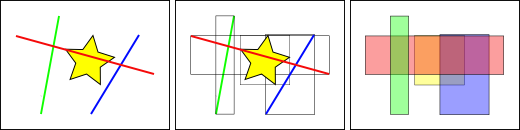
In the figure above, the number of lines intersecting the yellow star is 1 , which is the red line. However, the range boxes intersecting the yellow box include the red and blue ones, a total of 2.
The database solves the problem of "what line intersects with the yellow star" by first using a spatial index to solve the problem of "what bounding box intersects with the yellow bounding box" (which is very fast), and then "what line intersects with the yellow star". The above process only applies to the spatial features of the first test.
For large data tables, this "two-pass method" of indexing first and then performing local precise calculations can fundamentally reduce the amount of query computation.
Common indexing methods include: R-Tree, QuadTree, GeoHash, S2, H3, etc.
R-Tree:
For each spatial object, a Minimum Bounding Rectangle (MBR) is established, and these MBRs are recursively organized into a tree structure. The internal nodes of the tree contain the MBRs of multiple sub-nodes, which are used to quickly filter out irrelevant regions; leaf nodes store the actual spatial objects. When performing a spatial query, the R-Tree first uses the MBRs for quick filtering to find the set of objects that may meet the conditions, and then conducts precise spatial relationship judgments, thereby significantly improving query efficiency.
QuadTree:
Its core idea is to divide the entire space into four quadrants, with each quadrant continuing to be recursively divided until the number of objects contained within each region is less than the set threshold. Each node represents a spatial region, and leaf nodes store actual data objects. When performing a query, the QuadTree starts from the root node, sequentially checks which sub-nodes intersect with the query range, and recursively enters these sub-nodes, ultimately finding matching objects in the leaf nodes. This structure is simple to implement and suitable for scenarios such as image processing and map tile systems, but it may encounter imbalance issues when dealing with high-density or unevenly distributed data, affecting performance.
geohash:
The basic principle of geohash is: recursively divide the Earth's surface using a quadtree, where each division assigns a binary bit to the resulting sub-region, and finally a hash string for a specific region is given through base32/64 encoding. When querying, input the latitude and longitude, calculate its geohash, then specify the desired prefix length to match (e.g., 6 digits), and the algorithm will return regions with matching prefixes.
This indexing method is suitable for nearest neighbor search. And the longer the prefix, the more precise the match. However, it performs poorly at the "boundary", i.e., there may be cases where neighbors at the junction of rectangular regions do not have the same prefix.
s2:
Its core idea is to project the Earth's surface onto the six faces of a cube, with each face further recursively divided into small cells (referred to as Cells) in a quadtree structure. Each cell has a unique 64-bit integer ID (CellID) and supports up to 30 levels of resolution. The division at each level maintains the Hilbert curve order to ensure spatial locality. When performing queries, a set of spatial cells covering these geometries can be generated based on points, lines, or polygons, enabling efficient operations such as range queries and intersection judgments. This structure has a rigorous mathematical foundation, supports global seamless stitching, avoids boundary issues in traditional planar divisions, and is particularly suitable for complex scenarios such as high-precision spatial analysis, map tile systems, polygon coverage, and spatial aggregation. Although its implementation is relatively complex, it provides rich API support and is suitable for application systems requiring precise spatial operations.
h3:
The core idea is to divide the Earth's surface into a series of regular hexagonal grids (hexagons), with most regions being regular hexagons except for the polar regions. The entire division uses the Icosahedron unfolding method to form a hierarchical hexagonal grid system, with each layer having a different resolution (a total of 15 layers). Each hexagonal cell is assigned a unique 64-bit integer ID, which contains information such as the cell's layer information, parent cell path, and position offset. When performing queries, data in the surrounding area can be quickly obtained by finding the neighbors of a certain hex (up to 6), the K-ring range, etc. This structure is naturally suitable for neighborhood analysis and heat map display, with good spatial uniformity and aggregation capabilities. H3 performs particularly well in scenarios such as spatial aggregation, spatial connection, and path planning.
The geos library provides support for R-Tree and Quad-Tree. s2 and h3 each have their own officially provided libraries. GeoHash, on the other hand, requires additional third-party library support.
First, focus on the R-Tree index and S2 index:
The R-Tree index is the index type used by PostGIS to support spatial relationship query functions such as ST_XXX defined in the OGC standard. In actual development, you can directly create an R-Tree object, insert data, serialize it, and write it to disk.
The S2 index library does not support standard geographic information SQL query statements, but these functions can be simulated through its provided APIs. S2 provides S2ShapeIndex as the core index structure, which is used to manage geometric objects such as points, lines, and polygons, and supports various spatial query operations such as efficient inclusion judgment, nearest neighbor search, and intersection detection. At the same time, S2 provides serialization and deserialization functions. It should be noted that the S2 library uses its own defined spatial data types rather than the OGC standard WKT/WKB, and manual conversion is required.
Note: Not all spatial functions will use indexes! Functions that support the use of spatial indexes in PostGIS include: ST_Within,ST_DWithin,ST_Intersects,ST_Contains,ST_Covers,ST_Overlaps,ST_Crosses,ST_Equals
User Use Case: pymilvus + restful
pymilvus
from pymilvus import MilvusClient,DataType
collection_name = "geo_point_collection"
milvus_client = MilvusClient("http://localhost:19530")

schema = MilvusClient.create_schema(
        auto_id = False,
        enable_dynamic_field = False,
)

# create geo fields
schema.add_field(name = "id",datatype = DataType.INT64,is_primary = True)
schema.add_field(name = "name",datatype = DataType.VARCHAR,max_length = 255)
schema.add_field(name = "location",datatype = DataType.GEOMETRY)

# create collection
milvus_client.create_collection(collection_name,schema)

# insert
data =[
        {"id": 1001,"name": "Shop A","location": "POINT(116.4 39.9)"},
        {"id": 1002,"name": "Shop B","location": "POINT(116.5 39.8)"},
        {"id": 1003,"name": "Shop C","location": "POINT(116.6 39.7)"}
]

milvus_client.insert(collection_name,data)
# query
# 1. spatial relationship

# The usage of spatial relationship querys are like this:
# ST_XXX({field_name}, {wkt_string})
# where {field_name} is the name of the field that you want to query,
# and {wkt_string} is the wkt string of the geometry.
# So the results of the query are the specific geometry objects in the field that
# meet the spatial relationship to a given geometry
# Including:
# ST_Contains,ST_Within,ST_Covers,ST_Intersects
# ST_Disjoint,ST_Equals,ST_Crosses,ST_Overlaps,ST_Touches

# ST_Within
within_wkt = "POLYGON((116.4 39.9,116.5 39.9,116.6 39.9,116.4 39.9))"
results = milvus_client.query(
        collection_name=collection_name,
        filter=f"ST_Within(location, '{within_wkt}')",
        output_fields=["name","location"]
)
print(results)


# ST_Covers
covers_wkt = "POLYGON((116.4 39.9,116.5 39.9,116.6 39.9,116.4 39.9))"
results = milvus_client.query(
        collection_name=collection_name,
        filter=f"ST_Covers(location, '{covers_wkt}')",
        output_fields=["name","location"]
)
print(results)

# 2. distance relationship
# The usage of distance relationship querys are like this:
# ST_DWithin
point_wkt = "POINT(116.5 39.9)"
distance = 10000 # meters
results = milvus_client.query(
        collection_name=collection_name,
        filter=f"ST_DWithin(location, '{point_wkt}', {distance})",
        output_fields=["name","location"]
)
print(results)

# ST_Distance
target_point = "POINT(116.5 39.9)"
results = milvus_client.query(
        collection_name=collection_name,
        filter=f"ST_Distance(location, '{target_point}') < 10000",
        output_fields=["name","ST_Distance(location, '{target_point}')"] # Here we may need to support the calculation of the result
)
print(results)

# 3. Others
# These queries need to do some calcutions in filter or output_fields like ST_Distance above,so we need to support this function.
# But it may be not easy,and confilict with the current implementation of the filter and output_fields.

# 4. hybrid query
# We may sometimes use a specific condition to query and get some caculation results,consider the following case:
# Hybrid query example: filter by coverage condition and calculate area for qualifying polygons

coverage_wkt = "POLYGON((116.3 39.8,116.7 39.8,116.7 40.0,116.3 40.0,116.3 39.8))"
results = milvus_client.query(
collection_name=collection_name,
        filter=f"ST_Covers(location, '{coverage_wkt}')", # Filter polygons that cover the specified area,here the location may not be a point,but can be a polygon
        output_fields=["name", "location", "ST_Area(location)"] # Calculate area for qualifying polygons
)

print("Polygons covering the specified area and their areas:")
for result in results:
        print(f"Name: {result['name']}, Area: {result['ST_Area(location)']} square meters")
restful
The usage method can be roughly inferred from the pymilvus example.
curl --request POST \
    --url "${CLUSTER_ENDPOINT}/v2/vectordb/entities/query" \
    --header 'accept: application/json' \
    --header 'content-type: application/json' \
    -d '{
        "dbName": "_default",
        "collectionName": "geo_point_collection",
        "filter": "ST_Within(location, ''POLYGON((116.4 39.9,116.5 39.9,116.6 39.9,116.4 39.9))'')",
        "outputFields": ["name", "location"]
    }'
Calculate the search results:
curl --request POST \
    --url "${CLUSTER_ENDPOINT}/v2/vectordb/entities/query" \
    --header 'accept: application/json' \
    --header 'content-type: application/json' \
    -d '{
        "dbName": "_default",
        "collectionName": "geo_point_collection",
        "filter": "ST_Distance(location, ''POINT(116.5 39.9)'') < 10000",
        "outputFields": ["name", "ST_Distance(location, ''POINT(116.5 39.9)'')"]
    }'
Combining the above possible usage scenarios, in the query and deletion scenarios, for the filter and output_field fields, it is necessary to support calculation during query and return the calculation results.
Implementation Plan
Dependency Installation
We currently require the following third-party libraries as basic dependencies:
| Dependency Name | Function Description |
|---|---|
| gdal | Provides encapsulation of geometric objects and support for spatial query operators |
| libspatialindex | Provides spatial index support |
Data Insertion
Overview of Insertion Mechanism
-
Shard mechanism: Users can configure the number of shards for each collection.
-
Mapping relationship:
-
Each shard → one virtual channel (vchannel)
-
A vchannel is assigned to a physical channel (pchannel), and multiple vchannels can share a pchannel
-
pchannel → StreamingNode (SN)
-
-
Data Flow:
-
After the Proxy layer verifies the data, it splits it into multiple packages;
-
Distributed to the corresponding shard's pchannel according to the rules;
-
StreamingNode receives and processes data.
-
Data writing process
-
SN timestamps each package to establish the operation sequence;
-
Data is first written on the WAL (Write Ahead Log) and divided into segments;
-
When a WAL segment is processed, a refresh operation is triggered;
-
Data is ultimately written to object storage;
-
The above steps are completed by StreamingNode.
Development sequence: Add support for the geo field from top to bottom
| Level | File/Module | Modify Target |
|---|---|---|
| Proxy Layer | internal/proxy/validate.go | Add validation logic for the geometry field |
| Data Layer | Multiple files | Responsible for memory structure, serialization, packaging, etc. |
| C++ Core Layer | Multiple C++ files | Added Geometry class, supporting Segment-related logic |
| See the appendix for the specific plan |
Query
- segment type
| Type | Status Description | Load Node |
|---|---|---|
| Growing | can write data and is in an active state | StreamingNode |
| Sealed | Read-only state, has been persisted to disk | QueryNode |
Trigger mechanism: When the Growing Segment reaches a certain size or after a period of time, it will be written as a Sealed Segment.
-
Brief Description of Query Execution Process
-
The user initiates a query request;
-
Proxy distributes queries in parallel to all StreamingNodes that hold the shard;
-
Each SN generates its own query plan:
-
Query data in the local Growing Segment;
-
Simultaneously communicate with QueryNode to query data in Sealed Segment;
-
-
All results are merged and then returned to the user.
-
-
Modification Point
- Phase 1: Support for regular query expressions (Expr)
| File Path/Module | Modify Target |
|---|---|
| plan.g4 | Add syntax definition for GIS query operators |
| internal/core/src/expr/exec/expression/Expr.cpp | Add expression evaluation logic for the geo field |
| Add Expression Node | Implement AST nodes for GIS operators such as ST_Contains and ST_Covers |
This stage only supports the use of GIS operators in the filter and does not involve aggregate calculations in output_fields.
- Phase 2: Support aggregation functions (such as ST_Area) in output_fields
Functional Objectives Supports queries in the following forms:
results = milvus_client.query(
    collection_name=collection_name,
    filter=f"ST_Covers(location, '{coverage_wkt}')",
    output_fields=["name", "location", "ST_Area(location)"]
)
Requires directly returning
the calculation result of ST_Area(location), rather than the original WKB/WKT data.
Index
-
Index building trigger process
-
Client requests to create an index:
- SDK sends
create_indexrequest;
- SDK sends
-
Server level processing:
-
Milvus does not immediately execute index building;
-
The request information is written to the log and sent to Datacoord via the channel;
-
-
Task Scheduling Phase:
-
Datacoord listens to this channel;
-
After receiving the request, create an indexing task and add it to the scheduling queue;
-
-
Execution Phase:
-
The scheduler distributes the task to a DataNode;
-
DataNode loads the target segment data from the object storage;
-
Build index;
-
Write the indexing results back to the object storage.
-
⚠️ Note: Each flushed segment will build an index independently.
-
-
Modification Point
| Level | Module/File | Modify Target |
|---|---|---|
| Go layer | pkg/util/typeutil/schema.go | Add IsGeometryType() function |
| internal/proxy/task_index.go | Update parseIndexParams() to support parsing Geo type parameters | |
| pkg/util/paramtable/autoindex_param.go | Add Geo index configuration item in AutoIndexConfig | |
| C++ Core layer | internal/core/src/index/IndexFactory.cpp | Supports the creation of R-Tree or Geo indexes |
| tools | internal/util/indexparamcheck/index_type.go | Update index type validation logic |
| Query Engine | internal/cgo/src/query/ScalarIndex.h | Add Scalar Index helper function |
| Segment Core | internal/core/src/segcore/FieldIndexing.cpp | Update the field index construction logic to support Geo types |
Appendix
insert modification point
Proxy Layer
-
File:
validate_util.go -
Modified content: Added logic for parsing and validating the geometry field.
Storage Layer
| File Name | Function Description |
|---|---|
| data_codec.go | Implement serialization and deserialization of geo data |
| data_sorter.go | Supports sorting of geo types |
| insert_data.go | Add support for geo data type and factory function |
| payload.go | Implement binary read and write support for geo data |
| payload_writer/reader | Provides read and write interfaces |
| serde.go | Mutual conversion between Geo data and Arrow, Parquet formats |
| util,print_binlog,test | Supplement of utility classes and test cases |
C++ Core Layer
Common Module
| File Name | Modified Content |
|---|---|
| Types.h | New GEOMETRY type enumeration added |
| Geometry.h/.cpp | Define the Geometry class, encapsulate WKB, and implement construction, serialization, basic spatial operations, etc. |
| fieldData.h/cpp/interface.h | Supports data management, population, and access for geo fields |
| array.h | Add support for geo array type |
| chunk.h/writer | Implement binary block writing of geo data |
| vectorTrait.h | Add judgment logic for the geo type, with the same status as JSON |
Segcore Module
| File Name | Modified Content |
|---|---|
| ChunkSegmentSealedImpl.cpp | Add geo type processing during loading and index building |
| ConcurrentVector.cpp | Store inserted data and add support for geo type |
| InsertRecord.h | Add geo support in append_field_meta |
| SegmentGrowingImpl.cpp/h | Add geo processing logic to the Insert method |
| SegmentSealedImpl.cpp | Add geo support to the data loading logic |
| Utils.cpp | Add geo-related support to the utility function |
Storage Module
| File Name | Modified Content |
|---|---|
| Event.cpp | Add geo support in the serialization section |
| Util | Add geo type handling in relevant cases |
Explanation of Design Key Points
| Member variable/function | Description |
|---|---|
| context_ | GEOS context handle, thread-safe |
| geometry_ | Geometry object in GEOS internal representation |
| wkb_ / wkb_size_ | Original data source in WKB format and its size |
| srid_ | Spatial Reference Identifier, default is 4326 (WGS84) |
| ConstructFromWKT/WKB | Supports constructing Geometry objects using WKT/WKB |
| to_wkt_string() | Returns a WKT string representation |
| to_wkb_vector() | Return WKB binary data |
| GetArea(), GetLength() | Get area and length |
| SpatialOps | Supports common spatial operations: equality, intersection, union, etc. |
| TransformToSRID() | Coordinate System Transformation |
| isValid(), repair() | Check validity and attempt to repair invalid geometry |
query modification point
Overview of Modifications
| File Path/Module | Modify Target |
|---|---|
| parser_visitor.go | Expand the SQL parsing layer to recognize aggregate functions |
| plan.proto | Define a new proto structure to represent the aggregation function |
| internal/proxy/util.go | Extend the processing logic of output_fields |
| task_query.go | Add aggregate function support in createPlan |
| internal/core/src/exec/aggregation | New aggregate function execution engine added to C++ layer |
| default_limit_reducer.go | Process calculated fields during the result merging phase |
| Custom Operator Implementation | Implement calculation logic such as ST_Area, ST_Length |