mirror of
https://gitee.com/dromara/easy-es.git
synced 2025-12-06 17:18:57 +08:00

2.0 KiB
2.0 KiB
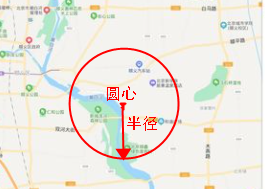
GeoDistance:直译为地理距离,实际上就是以给定的点为圆心,给定的半径画个圆,处在此圆内的点都能被查出来,使用较为高频,比如像我们用的外卖软件,查询周围3公里内的所有店铺,就可以用此功能去实现,没错你还可以用来写YP软件,查询下附近三公里内的PLMM...
API:
// 查圆形内的所有点
geoDistance(R column, Double distance, DistanceUnit distanceUnit, GeoPoint centralGeoPoint);

// 查不在圆形内的所有点 (0.9.7+ 版本支持)
notInGeoDistance(R column, Double distance, DistanceUnit distanceUnit, GeoPoint centralGeoPoint);
使用示例:
    @Test
    public void testGeoDistance() {
        // 查询以经度为41.0,纬度为115.0为圆心,半径168.8公里内的所有点
        LambdaEsQueryWrapper<Document> wrapper = new LambdaEsQueryWrapper<>();
        // 其中单位可以省略,默认为km
        wrapper.geoDistance(Document::getLocation, 168.8, DistanceUnit.KILOMETERS, new GeoPoint(41.0, 116.0));

        //查询不在圆形内的所有点
        // wrapper.notInGeoDistance(Document::getLocation, 168.8, DistanceUnit.KILOMETERS, new GeoPoint(41.0, 116.0));

        // 上面语法也可以写成下面这几种形式,效果是一样的,兼容不同用户习惯而已:
//        wrapper.geoDistance(Document::getLocation,"1.5km",new GeoPoint(41.0,115.0));
//        wrapper.geoDistance(Document::getLocation, "1.5km", "41.0,115.0");

        List<Document> documents = documentMapper.selectList(wrapper);
        System.out.println(documents);
    }
Tips:
- 同样的对于坐标点的表达形式也支持多种,和GeoBondingBox中的Tips介绍的一样,这里不再赘述.
- 索引类型和字段类型与GeoBondingBox中的Tips介绍的一样
- 对于宠粉的EE来说,兼容各种用户的不同习惯是理所当然的,所以你在使用时会发现大量方法重载,选一种最符合你使用习惯或符合指定使用场景的api进行调用即可.