mirror of
https://gitee.com/dromara/easy-es.git
synced 2025-12-06 17:18:57 +08:00

2.2 KiB
2.2 KiB
GeoBoundingBox: 直译为地理边界盒,由左上点和右下点构成的矩形范围,在此范围内的点均可以被查询出来,实际使用的并不多,可参考下图: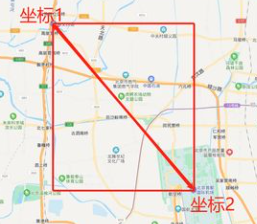
API:
// 在矩形内
geoBoundingBox(R column, GeoPoint topLeft, GeoPoint bottomRight);

// 不在矩形内 (0.9.7+版本支持)
notInGeoBoundingBox(R column, GeoPoint topLeft, GeoPoint bottomRight);
使用示例:
@Test
    public void testGeoBoundingBox() {
        // 查询位于左上点和右下点坐标构成的长方形内的所有点
        LambdaEsQueryWrapper<Document> wrapper = new LambdaEsQueryWrapper<>();
        // 假设左上点坐标
        GeoPoint leftTop = new GeoPoint(41.187328D, 115.498353D);
        // 假设右下点坐标
        GeoPoint bottomRight = new GeoPoint(39.084509D, 117.610461D);
        wrapper.geoBoundingBox(Document::getLocation, leftTop, bottomRight);

        // 查不在此长方形内的所有点
        // wrapper.notInGeoBoundingBox(Document::getLocation, leftTop, bottomRight);

        List<Document> documents = documentMapper.selectList(wrapper);
        documents.forEach(System.out::println);
    }
Tips:
- 上面使用示例仅演示了其中一种,实际上本框架中坐标点的语法支持非常多种,ElasticSearch官方提供的几种数据格式都支持,用户可按自己习惯自行选择对应的api进行查询参数构造:
- GeoPoint:上面Demo中使用的经纬度表示方式
- 经纬度数组 :[116.498353, 40.187328],[116.610461, 40.084509]
- 经纬度字符串:"40.187328, 116.498353","116.610461, 40.084509
- 经纬度边界框WKT:"BBOX (116.498353,116.610461,40.187328,40.084509)"
- 经纬度GeoHash(哈希):"xxx"
其中,经纬度哈希的转换可参考此网站:[GeoHash坐标在线转换](http://geohash.co/)
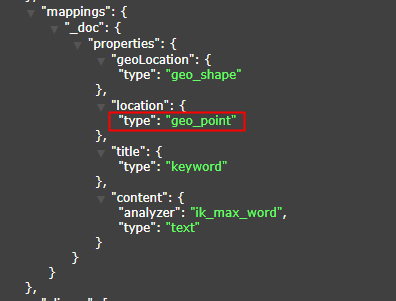
- 字段的索引类型必须为geoPoint,否则相关查询API失效,可参考下图.
- 字段类型推荐使用String,因为wkt文本格式就是String,非常方便,至于字段名称,见名知意即可.
public class Document {
	// 省略其它字段...
	private String location;
}