mirror of
https://gitee.com/dromara/easy-es.git
synced 2025-12-06 09:09:13 +08:00

2.1 KiB
2.1 KiB
This Demo demonstrates the use of Easy-Es in the Springboot project. It is recommended to download it first and run it directly on your local. Demo download link: Github
Demo introduction
1. Project structure
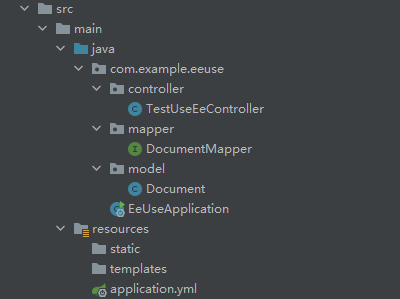
2.Configuration
easy-es:
  eanble: true # The default value is true, If the value of enable is false, it is considered that Easy-es is not enabled
  address: 127.0.0.0:9200 # Your elasticsearch address,must contains port, If it is a cluster, please separate with',' just like this: 127.0.0.0:9200,127.0.0.1:9200
  username: elastic # Es username, Not necessary, If it is not set in your elasticsearch, delete this line
  password: WG7WVmuNMtM4GwNYkyWH # Es password, Not necessary, If it is not set, delete this line
3.Run
Use your IDE to start the project:
4.Use
Use your browser or postman to request the following addresses in turn:
- http://localhost:8080/index (create index, must be requested first and only once)
- http://localhost:8080/insert (create data)
- http://localhost:8080/search (search data)
Then you will get the result what you searched in your browser or postman.
5.Summary
At this point, you have initially experienced the basic functions of Easy-Es. If you feel that the experience is good, and you want to further experience more powerful functions, you can check the reference document.