mirror of
https://gitee.com/dromara/easy-es.git
synced 2025-12-06 17:18:57 +08:00

145 lines
4.4 KiB
Markdown
145 lines
4.4 KiB
Markdown
> 本Demo演示Easy-Es与Springboot项目无缝集成,建议先下载,可直接在您本地运行.
|
|
> Demo下载地址: ✔[Gitee](https://gitee.com/easy-es/easy-es-springboot-demo) | ✔ [Github](https://github.com/xpc1024/easy-es-springboot-demo)
|
|
|
|
# Demo介绍
|
|
|
|
---
|
|
|
|
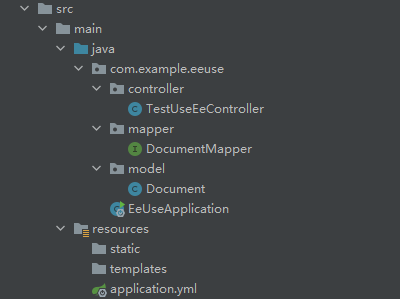
## 1.项目结构
|
|
|
|
---
|
|
|
|
|
|
|
|
<br />为了演示方便,本demo省略service层
|
|
|
|
## 2.Pom
|
|
|
|
---
|
|
|
|
```xml
|
|
<?xml version="1.0" encoding="UTF-8"?>
|
|
<project xmlns="http://maven.apache.org/POM/4.0.0" xmlns:xsi="http://www.w3.org/2001/XMLSchema-instance"
|
|
xsi:schemaLocation="http://maven.apache.org/POM/4.0.0 https://maven.apache.org/xsd/maven-4.0.0.xsd">
|
|
<modelVersion>4.0.0</modelVersion>
|
|
<parent>
|
|
<groupId>org.springframework.boot</groupId>
|
|
<artifactId>spring-boot-starter-parent</artifactId>
|
|
<version>2.6.0</version>
|
|
<relativePath/> <!-- lookup parent from repository -->
|
|
</parent>
|
|
<groupId>com.example</groupId>
|
|
<artifactId>ee-use</artifactId>
|
|
<version>0.0.1-SNAPSHOT</version>
|
|
<name>ee-use</name>
|
|
<description>Demo project for Spring Boot</description>
|
|
<properties>
|
|
<java.version>1.8</java.version>
|
|
</properties>
|
|
<dependencies>
|
|
<dependency>
|
|
<groupId>org.springframework.boot</groupId>
|
|
<artifactId>spring-boot-starter-web</artifactId>
|
|
</dependency>
|
|
|
|
<dependency>
|
|
<groupId>io.github.xpc1024</groupId>
|
|
<artifactId>easy-es-boot-starter</artifactId>
|
|
<version>0.9.6</version>
|
|
</dependency>
|
|
|
|
<dependency>
|
|
<groupId>org.springframework.boot</groupId>
|
|
<artifactId>spring-boot-starter-test</artifactId>
|
|
<scope>test</scope>
|
|
</dependency>
|
|
</dependencies>
|
|
|
|
<build>
|
|
<plugins>
|
|
<plugin>
|
|
<groupId>org.springframework.boot</groupId>
|
|
<artifactId>spring-boot-maven-plugin</artifactId>
|
|
</plugin>
|
|
</plugins>
|
|
</build>
|
|
|
|
</project>
|
|
|
|
```
|
|
|
|
## 3.核心代码
|
|
|
|
---
|
|
|
|
```java
|
|
@RestController
|
|
@RequiredArgsConstructor(onConstructor = @__(@Autowired))
|
|
public class TestUseEeController {
|
|
private final DocumentMapper documentMapper;
|
|
|
|
@GetMapping("/index")
|
|
public Boolean index() {
|
|
// 初始化-> 创建索引,相当于MySQL建表 | 此接口须首先调用,只调用一次即可
|
|
LambdaEsIndexWrapper<Document> indexWrapper = new LambdaEsIndexWrapper<>();
|
|
indexWrapper.indexName(Document.class.getSimpleName().toLowerCase());
|
|
indexWrapper.mapping(Document::getTitle, FieldType.KEYWORD)
|
|
.mapping(Document::getContent, FieldType.TEXT);
|
|
documentMapper.createIndex(indexWrapper);
|
|
return Boolean.TRUE;
|
|
}
|
|
|
|
@GetMapping("/insert")
|
|
public Integer insert() {
|
|
// 初始化-> 新增数据
|
|
Document document = new Document();
|
|
document.setTitle("老汉");
|
|
document.setContent("推*技术过硬");
|
|
return documentMapper.insert(document);
|
|
}
|
|
|
|
@GetMapping("/search")
|
|
public List<Document> search() {
|
|
// 查询出所有标题为老汉的文档列表
|
|
LambdaEsQueryWrapper<Document> wrapper = new LambdaEsQueryWrapper<>();
|
|
wrapper.eq(Document::getTitle, "老汉");
|
|
return documentMapper.selectList(wrapper);
|
|
}
|
|
}
|
|
```
|
|
|
|
## 4.启动及使用
|
|
|
|
---
|
|
|
|
### a.添加配置信息
|
|
```yaml
|
|
easy-es:
|
|
enable: true # 默认为true,若为false时,则认为不启用本框架
|
|
address : 127.0.0.0:9200 #填你的es连接地址
|
|
# username: 有设置才填写,非必须
|
|
# password: 有设置才填写,非必须
|
|
```
|
|
### b.启动项目
|
|
使用你的IDE启动项目<br />
|
|
|
|

|
|
|
|
### c.使用
|
|
依次在浏览器访问<br />[http://localhost:8080/index](http://localhost:8080/index) (仅访问一次即可,完成索引创建,相当于MySQL建表,有了表才能进行后续CRUD)
|
|
|
|
[http://localhost:8080/insert](http://localhost:8080/insert) (插入数据)
|
|
|
|
[http://localhost:8080/search](http://localhost:8080/search) (查询)
|
|
|
|
效果图:<br />
|
|
<br />
|
|
|
|

|
|
|
|
## 5.结语
|
|
|
|
---
|
|
|
|
至此,您已初步体验Easy-Es的基本功能,如果你感觉使用起来体验还不错,想进一步体验更多强大功能,那就继续往下看吧!
|